For Bolt.new Beginners
You Opened Bolt, Typed a Prompt and Felt Like a God.
Then you watched your tokens vanish, your app break itself, and your "finished" project sit on your screen with no way to get it live.
The First 10 Minutes Are Magic. Everything After That Is a Token Bonfire.
You describe your app. Bolt builds it. You feel invincible.
Then you ask it to change a button colour and it rewrites your entire navigation.
You ask it to fix that, and it breaks your checkout page.
You ask it to fix that, and suddenly you've burned through 500,000 tokens and the original problem is still there.
This isn't a "you" problem. This is a prompting problem.
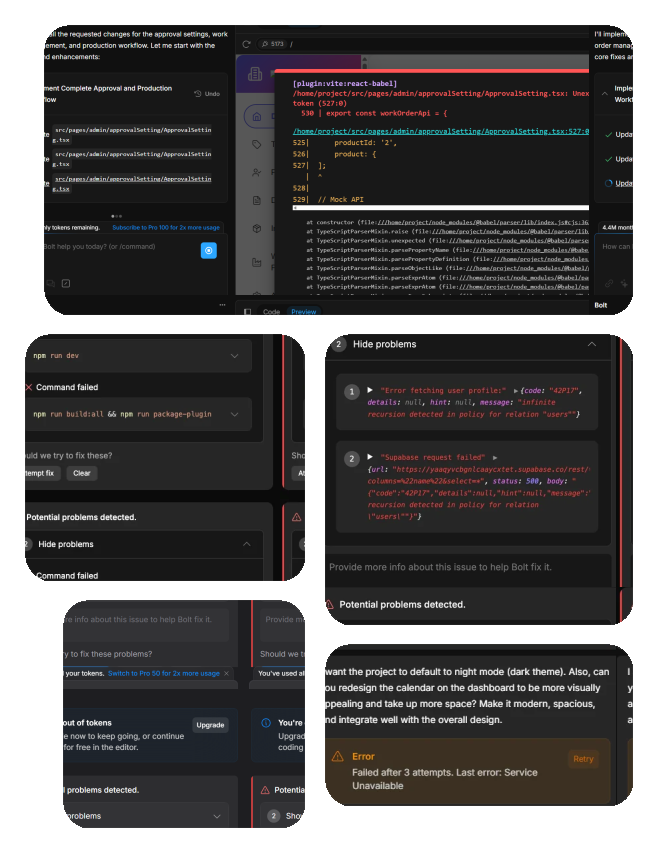
"I've decided to stop using the product because I've encountered significant issues of code quality. Burned through 2 million tokens and several hours without achieving my goal."
Bolt user, r/boltnewbuilders
The Difference Between Burning Tokens and Building Apps Comes Down to How You Talk to Bolt.
Bolt doesn't think. It doesn't "understand" your project.
It reads your prompt, loads your entire codebase into its context window, and tries to do exactly what you said, nothing more, nothing less.
When your prompt is vague, Bolt guesses.
When Bolt guesses, it touches things it shouldn't.
When it touches things it shouldn't, stuff breaks.
When stuff breaks, you ask it to fix it.
And now you're in the loop.
The fix isn't a smarter AI.
The fix is a more precise prompt.

Scoping
You tell Bolt exactly which files to touch and which to leave alone. No more "fix my app".
Instead, you point it at the specific component, the specific function, the specific line.
This alone can cut token usage by 60-80%, because Bolt stops loading your entire codebase into every request.

Sequencing
Instead of describing your entire app in one mega-prompt and hoping for the best, you break the build into stages.
Foundation first. Layout second. Logic third. Styling last.
Each stage locks in before you move to the next, so Bolt can't unravel earlier work.

Guardrailing
You include explicit instructions that prevent Bolt from doing the things that cause the most damage.
Like rewriting entire files when you only asked for one change, or installing dependencies you didn't request.
These are specific phrases, baked into your prompts, that keep Bolt inside the boundaries you set.
When you scope, sequence, and guardrail your prompts, the experience changes completely.
Bolt goes from being a chaotic code cannon to a focused builder that does what you actually asked it to do.
The people who "just get it" with Bolt aren't smarter than you.
They've just learned through thousands of tokens worth of trial and error how to structure their prompts so Bolt doesn't self-destruct.
This guide packages that trial and error so you don't have to pay for it yourself.
The Bolt Builder's Playbook: 50+ Tested Prompts That Actually Ship Apps
A PDF guide and prompt library built specifically for Bolt.new.
Not generic "AI prompts" you could find anywhere.
These are prompts written, tested, and refined inside Bolt for the exact problems Bolt users run into every day.

The Bolt Prompting Framework
The scope-sequence-guardrail method explained in plain English, with examples.
Understand why your prompts fail before you look at a single template.

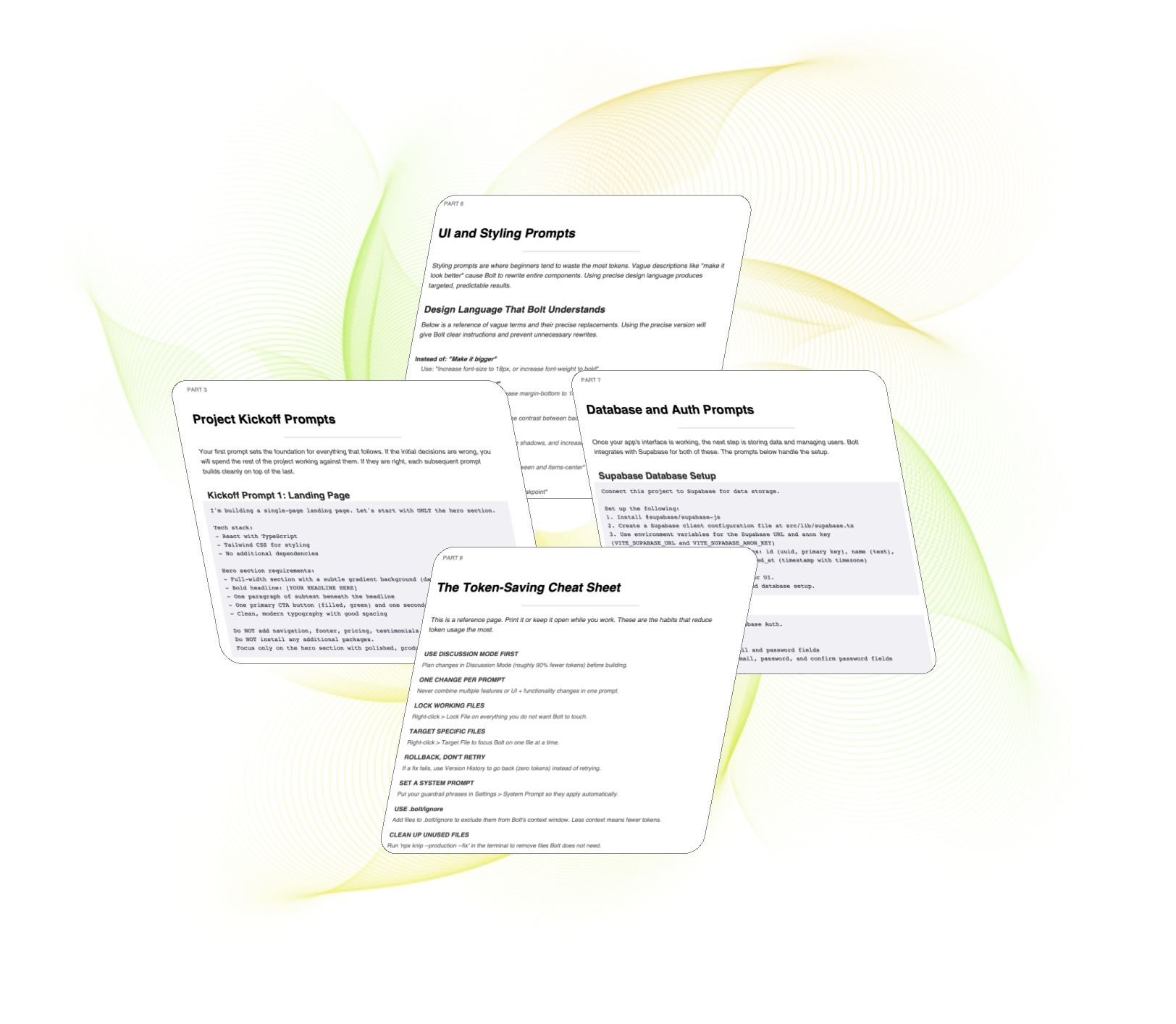
Project Kickoff Prompts
The first prompt matters more than any other.
These kickoff prompts set the right tech stack, folder structure, and component architecture from the start so Bolt doesn't make decisions you'll regret 30 minutes later.
Fix-It Prompts That Don't Create New Problems
Debugging prompts that point Bolt at the exact problem without letting it "helpfully" rewrite everything else.
Includes the file-locking phrases that stop Bolt from touching what's already working.

UI and Styling Prompts
How to describe visual changes to Bolt without it destroying your layout.
Colour, spacing, typography, responsive behaviour phrased in the way Bolt actually responds to.
Database and Auth Prompts
Supabase setup, user authentication, and data storage prompts that work on the first try.
Includes the security instructions that most beginners forget and that Bolt won't add on its own.

Deployment Prompts and Checklist
The step-by-step for actually getting your app live Netlify, Bolt Cloud, or custom domain.
Covers the "now what?" wall that stops most beginners from ever shipping.

The Token-Saving Cheat Sheet
A one-page reference of the phrases, structures, and habits that keep your token usage low.
Print it. Keep it next to your screen. Save hundreds of thousands of tokens per project.
This Is for You If You Opened Bolt and Thought "This Is Amazing"
Then Immediately Thought "Wait, Why Is It Doing That?"
You don't need to know how to code.
You don't need a computer science degree.
You don't need to watch 40 YouTube tutorials that each show you one trick.
You need a system that tells you what to type, when to type it, and what to tell Bolt not to do. That's what this is.
Every prompt is copy-paste ready.
Every example uses real Bolt projects.
Every section is written for someone who's building their first app, not their fiftieth.
Stop Feeding Tokens to the Void
£10
Instant PDF download. No subscription. No upsell.
One prompt from this guide will save you more than £10 in tokens. That's the bar.